
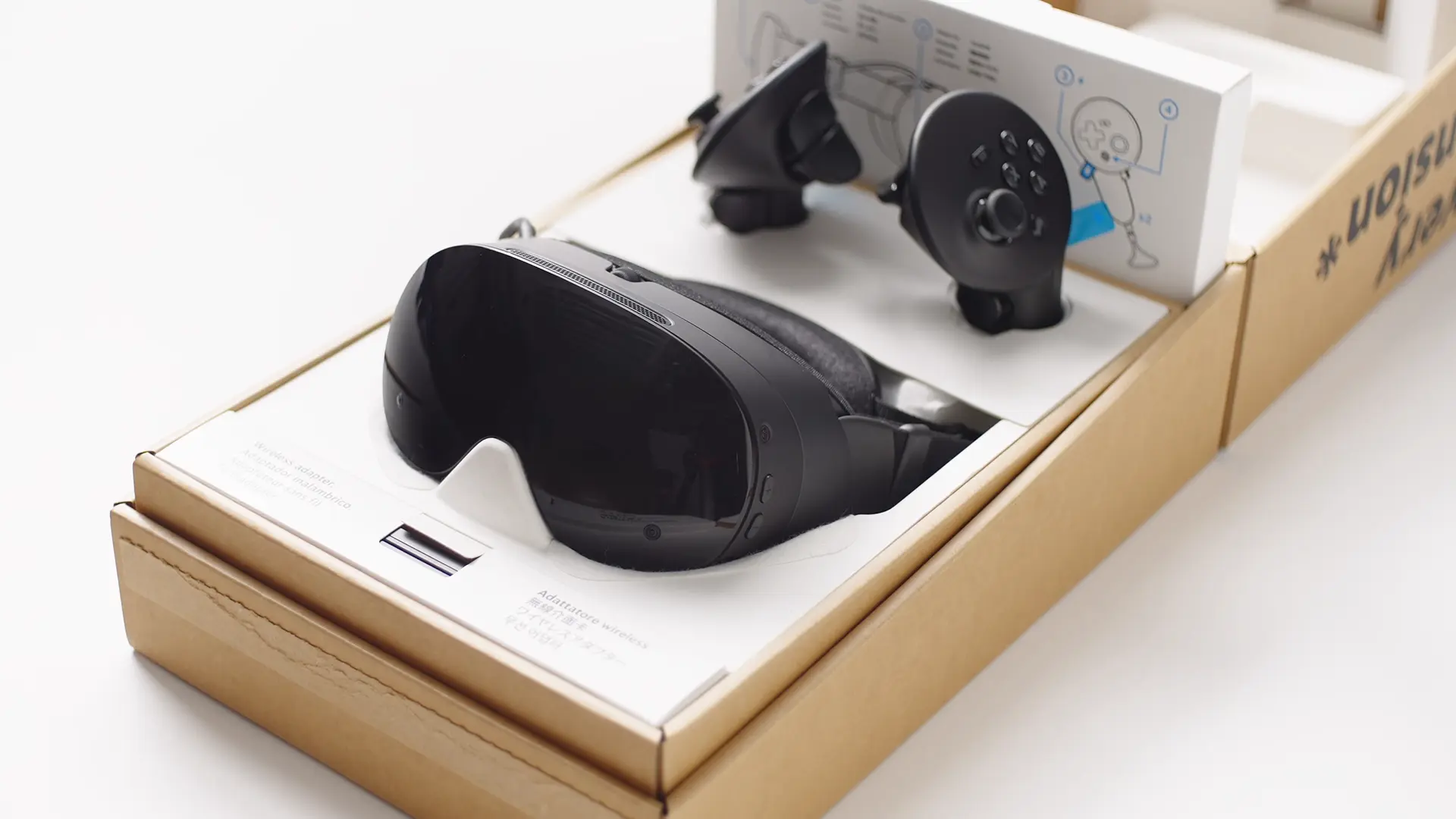
Valve has finally launched the Steam Frame, its own go at a standalone VR gaming headset and the last product left to release in its new hardware effort – that also includes the Steam Machine and updated Steam Controller.
And like the gear before it, this one is poised to be tricky to get, not just because of a fairly spicy asking price but modest availability. For that reason, Valve is once again asking keen buyers to throw their name in a lottery for the chance to pick one of these up. So here’s what you need to know about the Steam Frame, how much it’s going to set you back, and how to (attempt) to get your hands on one:
What is the Steam Frame?
The Steam Frame is Valve’s premium VR gaming headset, which can stream VR and non-VR games from a capable PC or Steam device using a dedicated wireless adapter, and can also act as a standalone gaming device with dedicated internals able to play Steam Frame-certified VR games without the need for external hardware.
Featuring built-in camera tracking, foveated rendering technology, dual-link PC connection and 4K 144Hz LCD panels along with included Steam Frame controllers sporting capacitive finger tracking, magnetic thumbsticks and easy-access AA battery compartments, the Steam Frame combines a lot from the best VR headsets out there into one device.
For those with a gaming PC, a Steam Deck or a Steam Machine, you’ll be able to stream both VR and non-VR games directly to the Steam Frame for access to the platform’s massive library. And if you don’t have access to or don’t want to rely on external hardware, there’ll be a comprehensive library of Steam Frame Standalone Verified games that you can play directly on the headset.
How much does the Steam Frame cost in Australia?
The Steam Frame headset starts at AUD $1609 for the 256GB Kit, or $1969 for the 1TB Kit. Both versions will come with a free download of Half-Life: Alyx.
Here’s what comes in the box:
- 4 nm Snapdragon® 8 Gen 3 – ARM64
- 16GB Unified LPDDR5X RAM
- 256GB or 1TB UFS storage, microSD card slot
- Rechargeable 21.6 Wh Li-ion battery
- 2160 x 2160 LCD (per eye)
- 72-144Hz refresh rate (144Hz experimental)
- Inside-out camera based tracking
- Headset: Wi-Fi 7, 2×2, Dual Radios
- Wireless Adapter Included (Wi-Fi 6E)
- Bluetooth 5.4
- Dual speaker drivers per ear, dual microphone array
- SteamOS 3
- Steam Frame Controllers – full 6-DOF and gamepad controls
- Half-Life: Alyx included
How do I buy a Steam Frame in Australia?
Now here’s the tricky part, because you can’t just jump onto the Steam website and add a Steam Frame headset to your cart. You’ll need to add your name to the list between now and Friday, September 18, 2026 at 3AM AEST, at which point Valve will close the lottery, pick the lucky few buyers at random and then let those folks know they’re able to complete a purchase.
You’ll have to choose ahead of time whether you want the 256GB or 1TB model, and you can only enter for one or the other, so make sure you’re sure of your storage needs ahead of time. It’s worth keeping in mind that there is a microSD cart slot available for expanded storage.
Does the Steam Frame come with a power supply?
No! Despite potentially spending close to two grand on a Steam Frame, you won’t be given a dedicated power supply. Presumably, this is to make global packing and shipping simpler with the limited units available, but it still stings. You can either buy the official Steam Hardware Power Supply Unit, use one from a Steam Deck if you’ve got one of those, or simply plug in any 45W or higher USB-C charger whenever you need to charger up your Steam Frame.
What other accessories can I get for the Steam Frame?
Aside from the Power Supply, there are also a couple extra bits available for purchase alongside the Steam Frame, depending on whether you need to replace the soft parts that already come in the box or you want the extra ergonomics afforded by the optional accessories kit.
Third party vendors have also crafted optional Steam Frame compatible accessories, including the Arcturus Vision Camera which adds 5K HDR colour passthrough and spatial video capture functionality to the Steam Frame, and prescription lens inserts from Zenni to help the glasses-wearers among us to play with greater comfort and clarity.
Here’s what’s available:
Steam Hardware Power Supply Unit – $49
- PD3.0 Type C power supply, 45W
- 2.5m cable
Steam Frame Ergonomic Accessories Kit – $99
- 2 Controller hand straps / battery doors
- 1 Headset top strap
- 1 Extended Light blocker
Steam Frame Accessory Replacement Kit – $99
- 1 Face Gasket
- 1 Head Cushion
- 1 Standard Light blocker
- 5K HDR Stereo Passthrough
- Spatial Video Recording & Playback App
- Sync App + Video Conversion
Zenni VR Prescription Lenses for Valve Steam Frame – $TBA
Steam Frame Signup FAQ
Here are the rest of the details you might need to know ahead of the Steam Frame lottery ending on Friday, September 18 at 3AM AEST:
Why a randomized reservation order?
We wanted to create a system that would be less frustrating and more fair for everyone. A launch that starts at a specific day and time tends to reward bots, people with fast internet connections, talented gaming fingers for quick F5/refresh reactions, and those who can schedule their life around that moment. By accepting reservation signups over the course of a few days, without any incentive to be first, we’re hoping to take away some of that friction. The longer timeframe also allows us to do some extra validation on the signups to make sure they’re real accounts, with only one per household.
Are there any criteria for signing up?
Customers must meet the following criteria to be able to sign up:
* You must have a Steam account in good standing.
* You must have made a purchase on Steam prior to April 27th 2026.
* Limit one signup per household. We will use payment method, shipping address, and other information to eliminate multiple entries.
What if I don’t sign up before September 18th at 3AM AEST?
After the one-time randomization at that time, anyone who signs up will be automatically added to the back of the waitlist.
Do I have to pick a specific model at signup?
Yes, you will choose between the 256GB model and the 1TB model at sign up. Each model has its own list of sign-ups that will be randomized on September 17th at 10am. After the shuffle, you will be informed whether you have a reservation spot or are on the waitlist for your chosen model.
Are these sign up lists separated by region?
Yes, there are separate lists for each shipping region – North America, United Kingdom/European Union, and Australia. You’ll be automatically placed in the lists for the region you’re in.
I received an email that I’m in the reservation queue, what does that mean?
It means you have a Steam Frame reserved for you. All you need to do is wait, and once we have it ready, we’ll send you an email with the option to purchase. You’ll then have 72 hours to complete the purchase before we cancel your reservation and move on to the next person in the queue.
When can I expect to get my order email?
We will begin emailing folks in the reservation queue on September 18th, in the order they were randomized into.
I received an email that I’m on the waitlist, what does that mean?
It means that when we did the one-time randomization of the reservation queue, your place in line ended up beyond the number of Steam Frame units currently available to ship. As we work our way through the queue, some customers may cancel their reservations. If that happens, you may be moved up in the reservation queue, and you’ll be notified via email that you have a reservation after all. But if not, nothing about your position in the waitlist changes, and any future production runs of Steam Frames will be offered to customers in the order they’re on the waitlist.
Can I change which model I reserved?
Once the randomization has occurred on September 17th, and you’ve received your reservation or waitlist email, you cannot change the Steam Frame model you have signed up for. Canceling a reservation or leaving the waitlist will release your spot.
Can people on the waitlist jump ahead of me when I have a reservation spot?
No. For any given list, we will only start sending emails to people on the waitlist once the reservation queue is exhausted. If you are in the reservation queue and read about someone on the waitlist receiving a purchase email ahead of you, they are likely in a different region than you.
What if I’m in Japan, South Korea, Taiwan, or Hong Kong?
Visit Komodo, our official distributor in those regions, to learn how to order in Japan, Taiwan, and Hong Kong. Steam Frame will be shipping in South Korea at a later date.
How do I get my free copy of Half-Life: Alyx?
When you log into Steam Frame, you’ll be prompted to redeem your copy in Settings. If you already have Half-Life: Alyx in your library, you will not be able to redeem another copy – only one copy can be redeemed per device.
How do I buy the Steam Frame accessories?
First-party accessories (the PSU, Accessories Replacement Kit, and Ergonomic Accessories Kit) will only be available to customers purchasing their Steam Frame as part of the add-to-cart process.
Like our content on covergeek? Hate dodgy AI summaries? Click here to add us as a Preferred Source on Google and see our posts more often!

Born into the world of video games through SEGA, and in particular Sonic the Hedgehog, Kieron’s gaming tastes now consist of the latest, shiny AAA thing, an indie darling or two, and an embarrassing number of hours of Balatro.